
Discord
Almost every FTC team runs on Discord, and almost every tool asks them to leave it. The Robolyst bot goes the other way: the work shows up in the channel your team is already in, and what happens there is written back to the portal, so the two never disagree about who claimed a task or who is coming on Saturday.
Free for every team · run by a 501(c)(3)
In use on Robolyst
Discord servers connected
17
+6 in the last 30 days
Announcements sent
42
+28 in the last 30 days
Saturday’s meeting asking the channel who is coming, and a task thread where the answer went back to the task.
Build meeting — Saturday
Intake handoff and driver practice. Bring the spare battery cart.
- When
- Sat 9:00 AM – 12:00 PM
- Where
- Room 114, shop door
Cedar Bots · Robolyst
Pressing one writes the attendance row the portal reads. There is no second list kept in Discord to fall out of step.
- Robolyst bot Today at 9:12 AM
Sally S. moved this to In Progress and set the due date to Thursday.
- John D. Today at 4:31 PM
Rollers are cut. Waiting on the 8mm hex, it shipped Tuesday, so Thursday is tight.
saved as a comment on the task, under John’s name
What teams say
-
this gotta be the best thing ever created, the amount of features and discord linkage is phenomenal

ITKAN-404
-
Robolyst is quickly becoming an all-in-one home for our team. It brings team management, documentation, and metrics together in one place, making it much easier to track what we accomplish, how engaged team members are, and the impact of our outreach. The mobile experience and Discord integration are especially valuable, allowing students to participate in whatever way works best for them, either in-app or right from the Discord server they're already using. Robolyst is incredibly easy to use and the development team is remarkably responsive to questions and suggestions. Highly Recommended

Blue Bananas
Point it at your own channels
Add the bot to your server once and pick which channel each kind of post goes to. There are seven, and they are separate on purpose: what the team is buying does not belong in the same channel as the build chat.
- Tasks and checklists go to forum channels: one post per task, one per run
- Announcements, schedule, match results and orders go to normal channels
- A leads-only channel takes budget alerts, receipt nags and approvals still waiting
- A surface you never point anywhere simply never posts. That is how you turn one off
- Nothing pings by default; you choose per channel whether a post mentions a role, @here or nobody
- Tasks forum build-tasks silent
- Checklists forum pit silent
- Announcements announcements @team
- Schedule general silent
- Orders purchasing silent
- Leads only leads @leads
- Match results not set, never posts silent
Seven surfaces, seven channels of your choosing. /setup reports whatever is still
unmapped, and the permissions the bot is missing.
Every task becomes a thread that answers back
A task opens as a forum post. Assignments, status changes, due dates and comments mirror into it as they happen, and a reply in the thread is saved as a comment on the task, attributed to whoever typed it. Nobody copies anything across.
-
/task claim,/task assign,/task dueand/task donework inside the thread, no id to paste - React to the post to take the task, or to mark it finished
- Right-click any message → Make a task, and the message becomes one
-
/task mineand/task listfilter by status or label, with autocomplete off your own team’s - The thread archives itself when the task reaches a done status, if you want it to
- Delete a task and its thread goes too, so the channel is never a graveyard of work that no longer exists
the intake rollers are chewed, someone has to machine new ones before Thursday
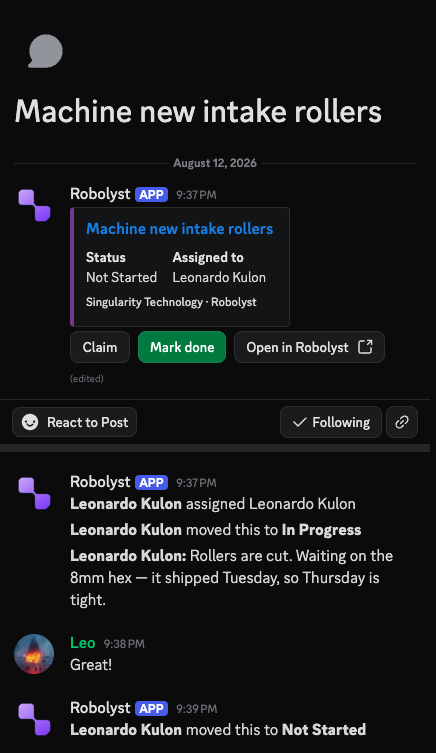
The thread it opens in #build-tasks. The post carries the task's status and its buttons; underneath it, every assignment, status change and comment, from either side, in the order they happened.
Replying in the thread saves a comment on the task, attributed to whoever typed it.
/task claim/task assign/task due/task doneChecklists that run in the pit
A checklist run posts as a forum thread with a button per item. Ticking one records who ticked it and when, against the same run the portal shows, which is what you want when the wifi is bad and the only reliable screen at a competition is a phone that is already on Discord.
-
/checklist runstarts one from your templates, with autocomplete - Runs scheduled ahead of a match post themselves
-
/checklist statussays how the open runs are going
- Robot weighed John D. · 8:41
- Battery strapped Sally S. · 8:44
- Driver station on field wifi John D. · 8:46
- Auto path selected
- Spare batteries on the cart
- Bumpers on, red
The whole FTC archive, on a slash command
Scouting arguments happen in the chat, so the numbers answer there. These commands reply in public, where the rest of the channel can read them, and they work for anyone in the server whether or not they have a Robolyst account.
-
/scout 14231gives a team’s season: record, metrics and awards -
/compare 14231 9052: two teams side by side -
/rankand/match: where you stand at the event you are at, and the match you play next -
/bracket,/advancementand/awardsfor an event;/nearbyfor the teams around you
/scout number:7034 run by anyone in the server, answered in public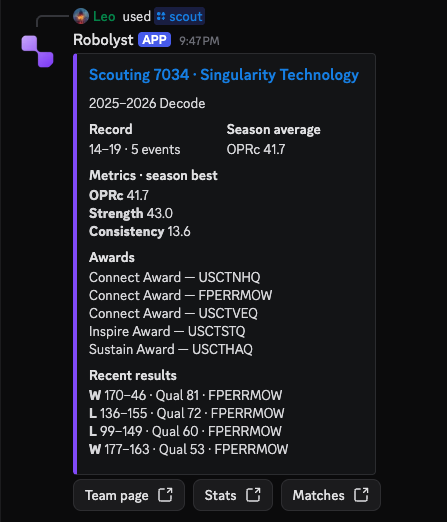
Record, season metrics, awards and the last matches played: the same numbers the site computes, with buttons through to the team page.
Every season on record, for any team in FTC/compare/rank/match/bracket/advancement/awards/nearbyRoles that follow the roster
Map a Robolyst role or subteam to a Discord role once and membership keeps itself in step: a student joining the drive subteam gets the channel, and a graduating one stops getting it. Members link their Discord from their account page, which is also what lets the bot mention the right person when a task is theirs.
- New joiners get a DM with the one step only they can do: linking their account
-
/setupreports what is unconfigured, including the permissions the bot is missing - Everything a member can do through the bot is what their Robolyst role already allows
- Mentors @mentors 4 members
- Drive subteam @drive-team 6 members
- Build subteam @build-crew 11 members
- Everyone on the roster @cedar-bots 26 members
You have been added to Cedar Bots on Robolyst. Link your account and the bot can hand you tasks, count your RSVP and give you the right channels.
A student joining the drive subteam gets the channel; a graduating one stops getting it. What anyone can do through the bot is what their Robolyst role already allows.
Questions teams ask
- We already post to Discord with a webhook. Is this different?
- Yes, in the direction it runs. A webhook pushes notifications out; the bot goes both ways: replies become comments, buttons record RSVPs and approvals, and commands read and write your team’s data. Teams that only want the notifications can keep the webhook, which still works.
- Can the whole server see our budget?
- Only if you point the finance channels at somewhere everyone can read. Each kind of post has its own channel, and the leads-only surface exists so budget alerts and pending approvals go somewhere private. A channel you never set is a channel that never gets posted to.
- What can people do without a Robolyst account?
- The FTC lookups: team, event, scouting, brackets, awards. Anything touching your team asks them to link a Discord account to a Robolyst one first, and then applies the same role permissions the site does. The bot is never a way around them.
- Will it fill the channel with noise?
- No post mentions anyone unless you tell it to, per channel. Tasks and checklists live in forum channels, so each one gets its own thread. Any surface you don’t want can be left unmapped.
- What permissions does the bot ask for?
- Reading and sending messages, embedding links, creating and managing threads, managing server events so meetings appear in the sidebar, and managing roles so they follow the roster. It never asks for administrator. If a permission is missing, /setup names it.
- We use Slack. Does any of this work there?
- The notifications do. Point a Slack webhook at a channel and announcements, task changes and competition results post there. The two-way bot, with its buttons, threads and commands, is Discord only.
- Does this replace the portal?
- It replaces having to open it. The data is the same data (a task claimed in Discord is claimed on the board, an RSVP in Discord is on the attendance register), so the person who prefers the site and the person who lives in the chat are working on one thing.
The rest of the toolkit
Discord is one part of the portal.
The roster, the build schedule, your documentation, the money and your public site run on the same free account. Setting it up takes an afternoon.