
Fiscal sponsorship and finance
Most FTC teams are not a nonprofit, so a company’s finance department has nobody to make the cheque out to and a parent ends up fronting the season on a personal card. Fiscal sponsorship puts the Robotics Catalyst Foundation’s 501(c)(3) behind your team: gifts become tax-deductible, the money sits in a balance the whole team can see, and students spend it on cards with their own limits. Not sponsored? Budgets, orders, expenses and reimbursements work the same for a team whose money sits in a school account or a booster club.
Free for every team · run by a 501(c)(3)
Sponsored or not
Every team gets the books. Fiscal sponsorship adds the money itself: a 501(c)(3) to receive it, a balance to hold it and cards to spend it.
What each team gets
| Feature | Any team | Sponsored |
|---|---|---|
| Season budgets, charged when the order is placed | ||
| Parts orders, expenses and reimbursements | ||
| Spending rules and approvals | ||
| Income logged by hand, reports and exports | ||
| Tax-deductible donations under a 501(c)(3) | ||
| A sponsor page with an EIN for companies | ||
| A team balance with monthly statements | ||
| Student debit cards with their own limits | ||
| A public ledger for sponsors | ||
| Cost | Free | 4% of money raised |
In use on Robolyst
Orders tracked
141
+78 in the last 30 days
Expenses logged
166
+100 in the last 30 days
Teams tracking money
29
20 active in the last 30 days
A company’s gift arriving under the 501(c)(3), and a student’s parts request spent on their own card, on one ledger.
- Oct 14 Card ··4417 · goBILDA receipt attached −$89.74 $3,182.55
- Oct 12 Administrative fee, 4% −$20.00 $3,272.29
- Oct 12 Sponsorship · Northfield Machining tax receipt sent +$500.00 $3,292.29
- Oct 9 Recurring gift monthly +$25.00 $2,792.29
- Compliant wheels, 3in ×8 @ $7.68 $61.44
- Hex shaft, 8mm × 200mm ×4 @ $5.10 $20.40
- Axial bearing block ×2 @ $3.95 $7.90
On screen
The page itself, captured out of the live demo, which anyone can open, without an account.
Open it yourself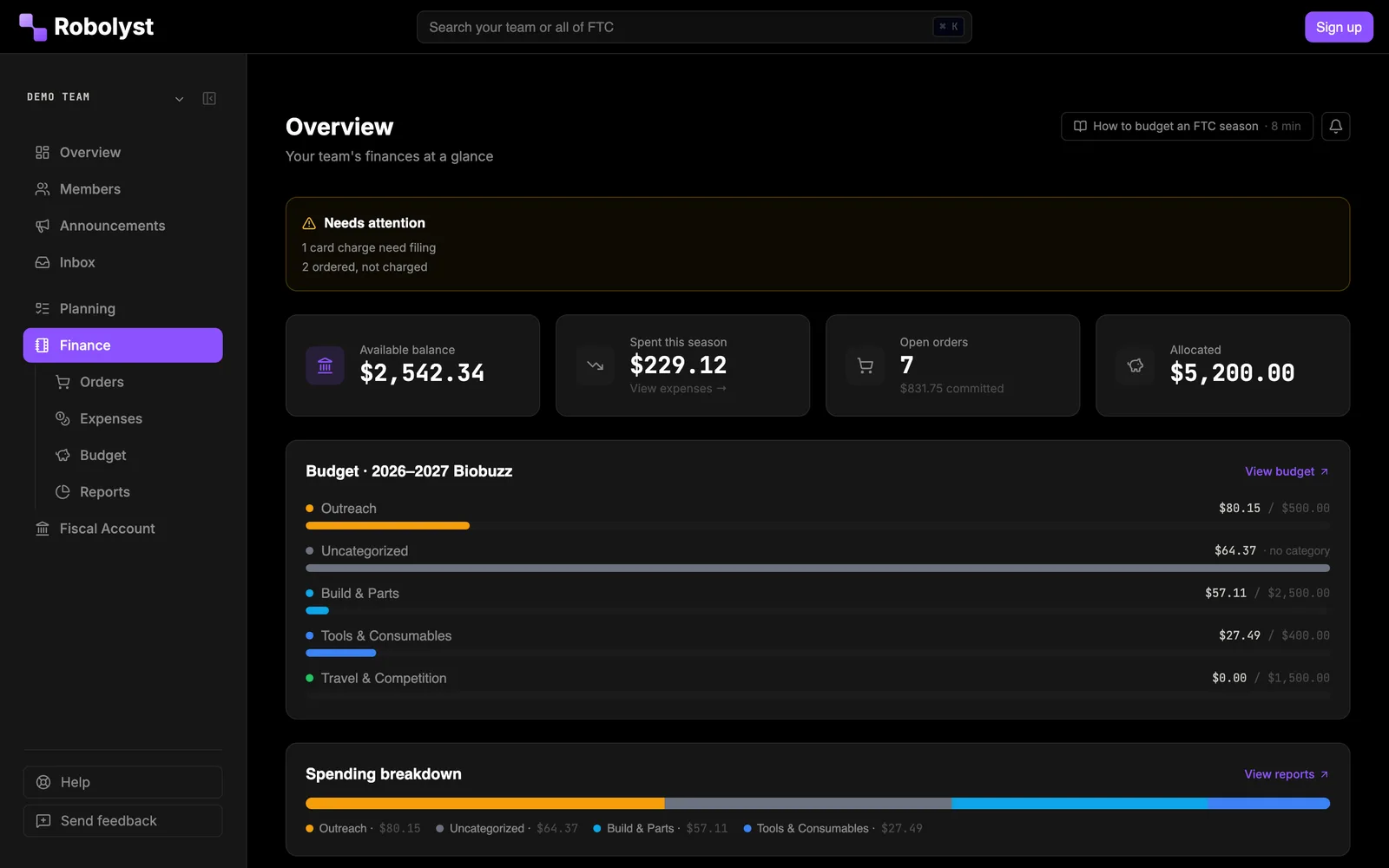
What teams say
-
Robolyst has genuinely been such a game changer for our team. There were so many organizational things that we had to use separate Google Docs and Sheets for, and having it all put in one place is really great. Especially the order request and budgeting has been amazing.

Theo, Operations Lead, FTC #27479
NO esc
-
Joining the Robolyst Platform has done wonders for our team in so many ways. Using their fiscal sponsorship program has allowed us to easily take donations and track our financial situation. It also simply allowed us to access so many more grants and sponsorships as it gave us 501(c)(3)/non-profit status. Alongside this, it has helped easily solve the challenge of documentation, being able to easily write down our progress, plans, future tasks, and much more. I believe that is the strongest part of Robolyst is how much it eases work for teams, and not only that, but they also improve upon these features by listening to teams using the platform.

Team Universal Genesis
Fiscal sponsorship
Applied for separately. Everything in this part needs it.
A 501(c)(3) your sponsors can write a cheque to
Under fiscal sponsorship, gifts go to The Robotics Catalyst Foundation, a 501(c)(3) with a real EIN, earmarked for your team. A donor gets a receipt they can deduct. A company gets a name, an EIN and an acknowledgement letter, which is usually where a sponsorship stalls. The Foundation holds the funds and directs them to your team’s work.
- Open to US-based teams, run by students or adults. A coach, mentor, parent or student can hold the account, and a parent or guardian co-signs for a student under eighteen
- Applied for inside Team HQ. Applications are usually reviewed within a week
- The agreement is signed in Team HQ and countersigned by the Foundation
- The signed agreement, the determination letter, the W-9 and the 990 sit on one documents page, ready for a company’s vendor form
- Your team files no tax return of its own. The Foundation files the 990
- Signed by your treasurer Sep 28
- Countersigned by the Foundation Sep 30
- IRS determination letter from the Foundation
- Form W-9 from the Foundation
- Most recent Form 990 from the Foundation
Everything a company's vendor form asks for, in one place
Donation and sponsor pages that pay into your balance
Each sponsored team gets a donation page for individuals and a sponsor page for companies. A gift is credited to the same balance your budgets and cards spend from, so nobody copies a donation into a spreadsheet.
- A tax receipt emailed the moment the gift goes through
- Recurring gifts, which donors manage from their own dashboard alongside every past receipt
- The details an employer’s matching-gift portal asks for, printed in the receipt email
- Cheque instructions on the sponsor page, with your team number as the memo
- Fundraising campaigns with a goal and an end date shown on the page
- A donation block for your team site
- A donor list that tracks who has been thanked
- Tax receipt emailed with matching-gift details
- Credited to your balance +$100.00
- On the donor list not thanked yet
The sponsor page prints cheque instructions with 14231 as the memo
Student cards with their own limit and expiry
Put a card in a student’s hands without handing over the account. Each card carries its own pot: an amount, an expiry, and the merchants it will work at. Spending is checked at the swipe, and what is left goes back when the card is handed in.
- Approve a parts request and the money is loaded onto that person’s card for that purchase
- Grants expire, so a card left in a toolbox in March is not a card with a balance in June
- Freeze one card, or the whole account, the moment something looks off
- Every transaction lands on the same ledger the budget page reads
A balance sponsors can check
The balance is a ledger with a running total, and a statement for each month goes to the people who handle the team’s money. A team that wants to can publish its ledger. The public version prints what was bought and what it cost, and never a name: no cardholder, no donor, no notes. The demo team’s ledger is open to anyone.
- Oct 14 Card ··4417 · Sally S. · goBILDA −$121.40
- Oct 12 Administrative fee, 4% −$20.00
- Oct 12 Northfield Machining · thanked +$500.00
- Oct 9 Recurring gift · R. Alvarez +$25.00
- Oct 14 goBILDA · Robot parts −$121.40
- Oct 12 Administrative fee, 4% −$20.00
- Oct 12 Sponsorship +$500.00
- Oct 9 Donation +$25.00
What it costs and what it asks of you
Applying is free. Each gift carries a 4% fee, shown on the ledger as its own line. Stripe takes its card fee (about 2.9% plus 30¢) first, and the 4% applies to what is left. Donors can choose to cover the card fee at checkout. Any rate change comes with 60 days’ written notice and only affects later gifts. In return, the Foundation asks a few things of you:
- Spend on the team only: parts, travel, registration and similar costs, never personal use
- Upload a receipt within 14 days of every card purchase. The cardholder is reminded when one is overdue
- Every purchase needs a clear team purpose and has to comply with FIRST rules
- Cards that break the rules get frozen
- If sponsorship ends, cards and recurring gifts stop and the balance stays intact to be paid out
- Donor pays, processing fee covered
- +$103.30
- Card processing, kept by Stripe
- −$3.30
- Administrative fee, 4% of $100
- −$4.00
- Credited to your balance
- $96.00
Box left unticked: the donor pays $100.00, Stripe keeps $3.20, the 4% is $3.87 and $92.93 is credited.
A rate change arrives as written notice, 60 days ahead
For every team
No sponsorship needed. These work wherever the money sits: a school account, a booster club or your own nonprofit.
Budgets charged when the order is placed
Set category budgets for the season and watch them against what has actually been committed, not just what has cleared. An order placed today counts against the budget today.
- Robot parts $1,420 of $1,800$1,040 cleared, $380 placed and not cleared, of $1,800
- Travel $600 of $2,400$600 cleared, $0 placed and not cleared, of $2,400
- Registration $425 of $425$425 cleared, $0 placed and not cleared, of $425
- Outreach $155 of $300$90 cleared, $65 placed and not cleared, of $300
Parts orders costed per item
Track what was ordered, from whom, for how much, and which subsystem it was for. Per-item costs put a real number on what the drivetrain cost.
- Drivetrain $612.40
- Intake $388.10
- Arm $245.75
- Electrical $179.30
- Outtake $92.20
- Mecanum wheel set, 104mm ×2 @ $149.99 $299.98
- Yellow Jacket motor, 312 RPM ×4 @ $41.99 $167.96
- U-channel, 15 hole ×6 @ $6.59 $39.54
Expenses and reimbursements
Mentors and students submit what they paid out of pocket with the receipt attached, and see where the request stands. Receipts are served through the app, so a receipt link cannot be guessed. An address given for a cheque is visible only to the person cutting it.
Only the person writing the cheque sees the address
Spending rules Team HQ enforces
Every team runs its money differently, and the argument about who can spend what usually happens in a group chat at 11pm. Write your policy down once in settings and it holds for every request.
- Auto-approve requests under an amount you choose, and route everything above it for approval
- Require a budget category, a product link or part number, and a needed-by date on every item
- Decide what happens when an approval would take a category over budget: block it, warn, or allow
- Require the invoice before an order can be marked placed
- Restrict purchasing to an approved vendor list
- Set who may log an expense at all, when a receipt is mandatory, and the figure above which a manager has to sign off
- Auto-approve requests under $50.00
- When an approval goes over budget
- Invoice required before an order is placed
- Receipt required on expenses over $25
- Product link or part number on every item
- Approved vendors only goBILDAREV RoboticsAndyMarkMcMaster-Carr
Exports your school’s finance office will accept
A season chart that traces income through funds into spending, exports for every table on the page, and a ledger CSV your school’s finance office will accept. Hand the login to next year’s treasurer and skip the conversation where nobody can say what the team spent on the robot.
- Ledger.csv
- Orders.csv
- Expenses.csv
- Season export.zip
Questions teams ask
- What is fiscal sponsorship?
- An existing nonprofit accepts money on a group’s behalf and spends it on the group’s work. Your team does not have to incorporate or apply for its own tax exemption. Donations go to the Robotics Catalyst Foundation’s 501(c)(3), earmarked for your team, and are tax-deductible to the extent the law allows. The terms are in the fiscal sponsorship agreement.
- Do we need fiscal sponsorship to use the finance tools?
- No. Budgets, orders, expenses, reimbursements, spending rules and exports work for any team, whether the money sits in a school account, a parent booster club or your own 501(c)(3). Fiscal sponsorship adds the balance, tax-deductible donations and cards, and is applied for separately.
- What does it cost?
- The finance tools are free, like the rest of the toolkit. Fiscal sponsorship carries a 4% administrative fee on money raised through it. A change to the rate arrives as a written notice. Card processing is charged by Stripe and sits outside the 4%.
- Who pays the card processing fee?
- The donor, if they choose to. Stripe charges about 2.9% plus 30¢ on a US card gift, and none of it goes to the Foundation. The donation page offers a box that adds the charge to the gift, so a $100 gift costs the donor $103.30 and $100 arrives. If the box is left unticked, Stripe takes its share out of the $100. Either way the 4% is worked out on what arrives, after Stripe.
- How does this compare to HCB?
- HCB, run by Hack Club, is a fiscal sponsor many student teams already use. Its fee is 7% of revenue. Ours is 4%, with card processing on top unless the donor covers it. The bigger difference is where the money lives: here the balance, cards and donations share a ledger with your budgets, parts orders and reimbursements, so an approved order loads the card and the spend lands against its budget category without anyone copying it across.
- What’s the catch?
- Four things. The 4% comes off every gift. Every card purchase needs a receipt within 14 days, and the Foundation can suspend cards while one is overdue. The money is held by the Foundation for your team, so it only goes on team costs and never to a person. And if sponsorship ends, the balance does not come back as cash: the Foundation moves it to a public charity, public school or school district your team names within 90 days, once the Foundation approves it. If nobody is named, it goes to the Foundation’s own charitable and educational work. The details are in sections 9 and 18 of the agreement.
- Do we need a card to use this?
- No. Cards come with fiscal sponsorship. Budgets, orders, expenses and reimbursements work without one, and a team that only tracks spend against a budget can switch income and balance tracking off entirely.
- Can students see the budget?
- As much of it as you want them to. Seeing the finance pages and seeing the amounts on them are two separate permissions, so a build lead can read an order’s vendor, part numbers and status with every price blanked. Being allowed to see everyone else’s orders is a third. Reimbursements stay with the people who handle them.
- Who approves an order?
- Whoever holds the permission, and never the person who asked. A request goes to someone else on the team by default. On a team where only one person can approve, that person can approve their own, and the ledger records that it happened that way.
- Can we take the records to our school’s finance office?
- Yes. Every table exports, the ledger downloads as a CSV, and each receipt stays attached to the expense it belongs to. The Export page bundles orders, expenses, reimbursements and the ledger into one zip for an audit or a handover.
Read next
The rest of the toolkit
Fiscal sponsorship and finance is one part of Team HQ.
The roster, the build schedule, your documentation, the money and your public site run on the same free account. Setting it up takes an afternoon.