
Documentation
Your documentation is the single highest-leverage record an FTC team produces. It is most of what the engineering portfolio and the Inspire Award are judged on, and it is almost always written in the last two weeks from memory. Documentation in Robolyst exists to make writing it during the season the path of least resistance.
Free for every team · run by a 501(c)(3)
In use on Robolyst
Docs written
1,224
+548 in the last 30 days
Teams documenting
46
30 active in the last 30 days
One subsystem, read as the chronology a judge asks you to walk them through.
- Nov 12 BrainstormRoller intake vs. claw: three sketches cycle-time estimates for each
- Nov 19 DesignCompliant roller CAD, v1 4 CAD screenshots
- Nov 26 BuildFirst assembly on the practice bot
- Dec 3 TestTwo samples at once jams the throat video · linked to task
- Dec 10 IterateWheels at 45°, throat widened 6mm
On screen
The page itself, captured out of the live demo, which anyone can open, without an account.
Open it yourself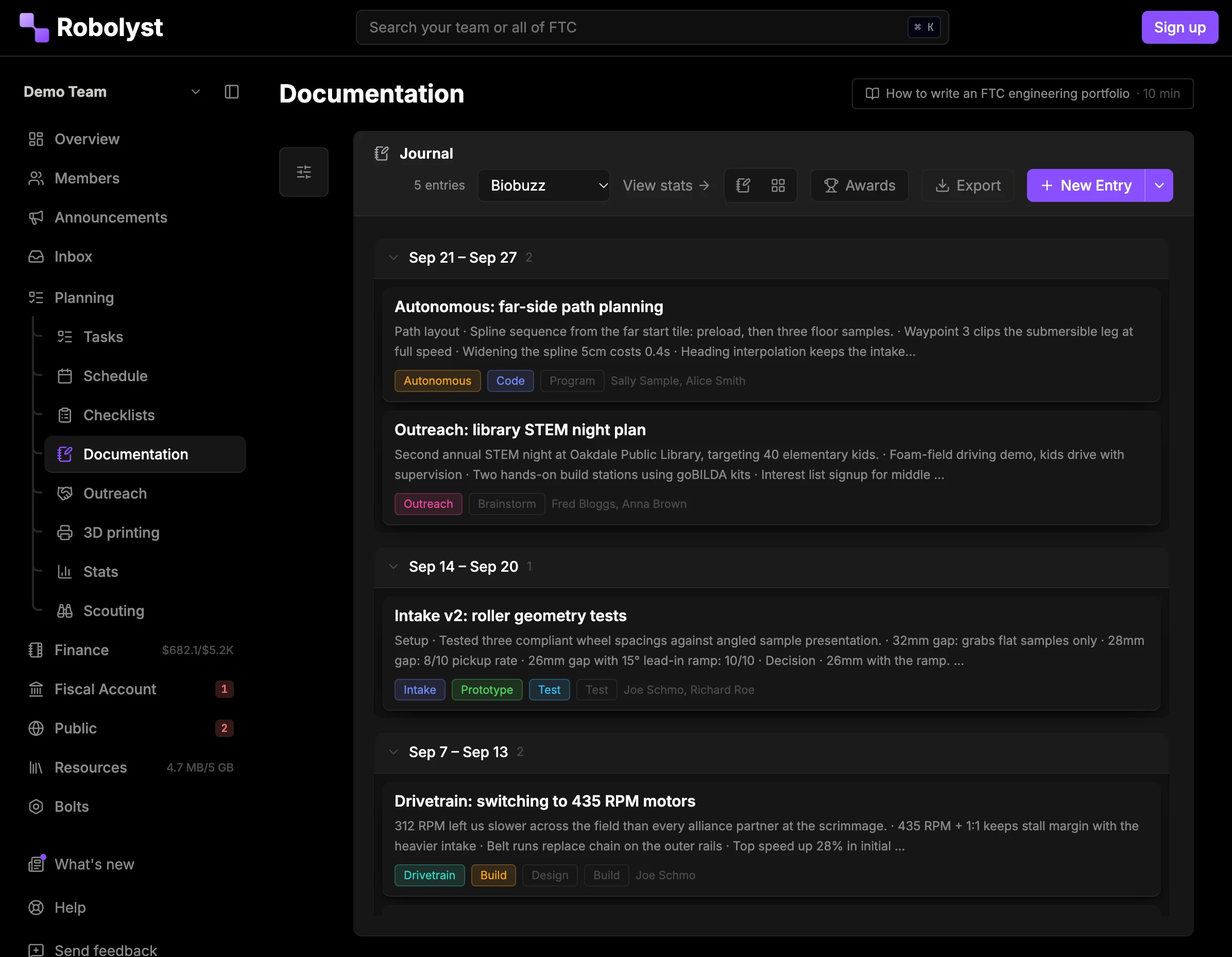
What teams say
-
I love Robolyst. It helps make documentation and taking notes much easier. Since my team started using Robolyst meetings have also started to become much smoother.

Blood, Sweat, and Gears
-
Robolyst is quickly becoming an all-in-one home for our team. It brings team management, documentation, and metrics together in one place, making it much easier to track what we accomplish, how engaged team members are, and the impact of our outreach. The mobile experience and Discord integration are especially valuable, allowing students to participate in whatever way works best for them, either in-app or right from the Discord server they're already using. Robolyst is incredibly easy to use and the development team is remarkably responsive to questions and suggestions. Highly Recommended

Blue Bananas
-
Robolyst has made managing our robotics team so much easier. It gives us one place to handle everything from meeting notes and task assignments to 3D prints, parts orders, finances, and budgets. The platform is easy to use, and adding tasks or keeping track of what needs to get done is simple and straightforward. Instead of juggling multiple apps and spreadsheets, we can keep everything organized in one place. It’s a great tool for keeping our team on track and making sure nothing falls through the cracks! 10/10 would recomend!

Tate, Captain, FTC #5026
Tesla Coils
Log entries from a phone in the shop
Write an entry from a phone in the shop, tag it to a subsystem and a design stage, and it lands in your documentation in order. No separate document to remember to open.
Filed by subsystem and design stage, for judging
Entries carry subsystem, stage and date, so your documentation can be read as a chronology or as the story of one mechanism. Both are questions judges ask.
- Subsystems you define: drivetrain, intake, outtake, autonomous, whatever the robot has
- Design stages from concept through iteration to final
- Photos, CAD screenshots and video embedded inline
- Links between entries, tasks and the parts that were ordered for them
An editor that cites tasks, parts and awards
A real editor (headings, lists, tables, images, embeds) and a text box nowhere in sight. Type @ to pull in a task, a teammate, a part you ordered or an award, and it stays live: the entry updates when the thing it cites does.
- Photos dropped straight into an entry, and every one of them filed in the team’s image library on the way past
- Albums and subsystem filters, so “show me the intake, all season” is two clicks
- The same library the public site pulls from, so a photo used for judging can be used on the sponsor page
- Turn smart tagging on and the subsystem, stage and entry type are proposed from what you wrote. You click to accept
The links stop living in the group chat
Every URL you cite in an entry (the CAD folder, the vendor part page, the section of the game manual an argument turned on) is collected into the team’s Resources list on its own. One row per link, however many entries reference it, so the reference material is findable without reopening the entry that mentioned it.
- Titles, descriptions and site icons are read from the page; you paste a URL and nothing else
- Filed by category (game manual, CAD, vendors, docs, media) and searchable
- Pin the handful everyone needs and they sit at the top for the whole team
- Open counts show which references are actually being used
- Links pasted into tasks arrive the same way, so the team keeps one list
Last year’s documentation carries over
Last year’s documentation is still there next year, which is how a rookie learns why the drivetrain is the way it is.
Questions teams ask
- Can we still print it for judging?
- Yes. Export one entry, or everything in the current filter, as a PDF or Markdown. Entries keep their order and their dates.
- Is this our engineering portfolio?
- It is what the portfolio gets written from. The portfolio is short and page-limited; documentation is the full season, filed by subsystem, so every claim in the portfolio has a dated entry behind it when a judge asks.
- Who can write entries?
- Anyone on the team you give the permission to. Documentation access is a role permission like everything else in Team HQ.
- Does it replace a paper log?
- It replaces the scramble to assemble one. Plenty of teams still keep a paper log at the machine; this is where it gets turned into something judges can follow.
- Where do the links we reference end up?
- In Resources, the team’s shared link list. Anything you paste into an entry is added there automatically, and you can add links by hand (the manual, the CAD folder, a vendor) and pin the ones people need every week.
Read next
The rest of the toolkit
Documentation is one part of Team HQ.
The roster, the build schedule, your documentation, the money and your public site run on the same free account. Setting it up takes an afternoon.