Robolyst Robolyst
The Robolyst toolkit

Run the whole season from one place.

Your roster, your team inbox, your build schedule, your documentation, your parts money, and your public site: thirteen workspaces on the same account you already use to scout the field, plus a Discord bot that runs them from the server your team is already in. Built by an FTC team, for FTC teams.

Free for every team · run by a 501(c)(3) nonprofit

One week of a build season, as the portal sees it.

Nothing here is a separate app. A meeting on the calendar carries the tasks due that day; a finished task asks for a documentation entry; that entry cites the part you ordered.

  1. Mon

    Build meeting logged. Attendance taken on the way in.

  2. Wed

    Intake redesign moves to In Progress. Two people are unblocked.

  3. Thu

    Iteration 3 written up, tagged Intake · Test, photos attached.

  4. Fri

    Parts request approved and ordered against the robot budget.

  5. Sat

    Pre-match checklist runs itself 15 minutes before every match.

Adoption

Most of your team never has to open Robolyst.

One more website is one more thing nobody signs into. So the parts a whole roster touches reach them where they already are: the server they are in every night, the calendar on their phone, a sheet of paper in the pit. Everything they do out there is written back here.

In Discord

A bot in your own server. Tasks open as threads and reply back, meetings ask who is coming with buttons, order requests get approved in the channel.

Nobody needs a Robolyst account to press a button.

On their calendar

One subscribe link per team. Apple Calendar, Google Calendar, Outlook.

Every new meeting, cancellation and time change follows on its own.

On paper in the pit

Checklists tick from a phone. Pit scouting is a QR code taped to the table: scan, fill it in, done.

No login, no app, works on a borrowed phone.

By email

Sponsors and event coordinators write to the team address and get a reply from whoever is handling it.

They never learn there is a portal behind it.

The people who do sign in are the ones running things

Captains, subteam leads, the treasurer, your coach. Accounts are free and unlimited, so there is no reason to ration them. But a season works with four people signed in and the rest reached through Discord and a calendar feed.

Team

Who is on the team, what everyone just found out, and who wrote in.

Rosters churn every September. The portal assumes that: students join with a link, mentors and alumni are marked as such, subteams own their own work without a separate group chat, and the address sponsors email belongs to the team rather than to whoever set it up.

Members

/team-management/members

  • Invite by email, or share one join code that anyone on the team can use.
  • Add students who have not signed up yet as placeholders, then merge them in when they do.
  • Subteams (drivetrain, programming, outreach) each with their own lead.
  • Mark coaches, mentors, and alumni so the roster still reads correctly in year four.
  • Titles, grades, and headshots feed the public site and your documentation.
Roster sample
  • MR

    Maya Ramírez

    Captain

    Owner
  • DK

    Devon Klein

    Programming lead

    Manager
  • PS

    Priya Shah

    Grade 11

    Member
  • MA

    Mr. Alvarez

    Coach/Mentor

    Manager
  • SW

    Sam Whitaker

    Invite pending

    Member
Subteams DrivetrainIntakeOuttakeArmAutonomous

Announcements

/team-management/announcements

  • Write it once. It lands in-app, by email, and in your Discord or Slack channel.
  • Pin what matters so it stays at the top of everyone’s portal.
  • Aim a post at one subteam instead of spamming the whole roster.
  • Keep a draft until it is ready, then publish when it is.
  • Every post is dated and attributed, so nobody argues about what was said.
What the Discord bot does, in depth
Announcements sample
  • Pinned 2h ago · Maya R.

    Load-in is 6:30am Saturday

    Trailer is packed except the pit banner. Drivers meet at the school gate, bring your safety glasses.

  • Autonomous Yesterday · Devon K.

    Autonomous freeze is Wednesday

    Anything not merged by the end of Wednesday’s meeting waits until after the league meet.

  • Draft Not published · Priya S.

    Sponsor thank-you letters

    Going out once the outreach subteam finishes the photo picks.

Delivered In-app Email Discord

Inbox

/team-management/inbox

  • Claim one address, yourteam@robolyst.org, that the whole team can read, not one student.
  • Assign a thread to whoever is handling it, and close it when it is answered.
  • Reply as the team, with formatting and attachments up to 20MB.
  • Remote images and tracking pixels stay blocked until you ask for them.
  • Search subjects, senders, and message text back through every season.
How a team email address works, in depth
cedarbots@robolyst.org sample
  • Hexbots 5291 2h
    Re: sharing our intake CAD
    Files are attached, happy to walk you through the...
  • Ana Whitcomb Tue
    Sponsorship for the 2026 season
    We can renew at the gold level again this year.
  • Cedar Valley League Mon
    Load-in times for League Meet 3
    Pits open at 6:30am. One cart per team, please.
Ana Whitcomb ana@vantagemachining.com
to cedarbots@robolyst.org · Tue 4:12 PM

We can renew at the gold level again this year. Send the sponsor packet over and I’ll get it signed. Our logo is attached for the pit banner.

vantage-logo.svg Remote images blocked
Reply Assigned to Maya R. Open
Who can read it Anyone you grant inbox access Kept when they graduate
Build

The work itself: what is due, who is blocked, what got written down.

This is the half of the portal a team touches every meeting. Tasks, the calendar, pit checklists, and documentation are one system, so finishing something in one place updates the others.

Tasks

/team-management/tasks

switch the view
Board, grouped by status same four tasks
Not Started 1

Mount intake to chassis

Chassis blocked
Build subteam Sat
In Progress 2

Machine new intake rollers

Intake
Maya R. Thu

Tune far-side auto path

Autonomous
Devon K. Fri
Complete 1

Write up intake iteration 3

Intake
Priya S. Wed
  • Statuses are yours to name. The four above are only the defaults.
  • Dependencies: a task states what blocks it, and what it unblocks.
  • Assign a person or a whole subteam.
  • Tags, subsystems, priority, and due dates, all filterable.
  • Comments with @mentions, plus an activity log of every change.
  • Link a task to a checklist or a documentation entry.
  • Group by status, assignee, subsystem, or priority in any view.
  • Due-soon and overdue work notifies the person responsible.
  • Finish a task and the documentation prompt is waiting.
This week sample
3 Mon
4 Tue
5 Wed
6 Thu
7 Fri
8 Sat
9 Sun
  • Build meeting

    Mon 4:00–7:00pm · 14 of 18 present

    Meeting
  • Library STEM night

    Wed 6:00pm · Outreach · 3 hrs logged

    Outreach
  • Cedar Valley League Meet 3

    Sat 7:00am · Synced from the FTC schedule

    Competition

2 tasks due Saturday show up on the event itself

Schedule

/team-management/schedule

  • Meetings, scrimmages, outreach, and competitions on one calendar, colour-coded and filterable.
  • Recurring meetings: cancel one occurrence or the whole series, and edits autosave.
  • Attendance per meeting, feeding the season stats.
  • Agendas and notes live on the event, not in someone’s DMs.
  • Tasks due that day surface on the event itself.
Why the schedule syncs from FIRST

Your FTC competitions, pulled in, not retyped

Search the same live FTC event database this site runs on, and add your league meets, qualifiers, and championship with their real dates, venues, and start times. When the event schedule changes, so does yours.

Add a competition sample
  • Cedar Valley League Meet 3

    Sat Jan 17 · Cedar Valley HS

    On your calendar
  • Northgate Qualifier

    Sat Feb 7 · Northgate HS

    Add

On the calendar app your team already checks

Every team gets a private feed. Subscribe once from Apple Calendar, Google Calendar, or Outlook and every new meeting, cancellation, and time change follows. No exports, no re-adding, no “did you see the message?”

Calendar feed sample
webcal://robolyst.org/api/calendar/…
Apple CalendarGoogle CalendarOutlook

Read-only, revocable, and separate from the reminders the portal sends you.

Checklists

/team-management/checklists

  • Write a template once, then run it as many times as the season needs.
  • Start from a real preset: Pit Setup, Competition Packing, Pre-Match, Robot Inspection.
  • Sections and quantities: six charged batteries, not one line saying “batteries”.
  • Auto-runs: 15 minutes before every match, or an hour before a competition.
  • Checking off is live and team-wide, and works with no signal in the pit.
  • Missed items are recorded, so the same thing stops being forgotten.
Checklists that run, in depth
Pre-Match try it
2/6
auto-runs 15 min before each match checks queue offline

Documentation

/team-management/documentation

Documentation kept as you go instead of the week before judging. Entries are typed by subsystem, entry type, and where they sit in the design process, so the board view shows how a subsystem actually progressed.

  • A real editor: headings, lists, images, and @-links to tasks and teammates.
  • A media library of every photo, filterable by subsystem and season.
  • Entries map to the awards they support, so gaps are visible before judging.
  • Anyone can write; only managers can delete.
Documentation, in full
Entry sample
Intake Test Iterate Priya S. · Wed

Intake iteration 3: compliant wheels at 45°

Straight rollers stalled on two samples at once. Angling the wheels fixed the jam but cost us 0.4s per cycle, so we widened the throat by 6mm and re-tested.

links to task Machine new intake rollers
  • roller-jam-2up.jpg
  • wheel-angle-45.jpg
  • cycle-timing.mp4
  • throat-6mm.jpg
Design process Identify ProblemBrainstormResearchDesignBuildProgramTestIterate
Resources sample
  • DECODE game manual, part 2

    firstinspires.org

    214 opens
  • Robot CAD — 2025–26

    cad.onshape.com

    96 opens
  • goBILDA — order history

    gobilda.com

    41 opens
  • Programming resources

    ftc-docs.firstinspires.org

    27 opens

5 more found this week in tasks and documentation entries

Resources

/team-management/resources

  • The game manual, the CAD folder, the vendor you always reorder from: one list instead of five pinned messages.
  • Paste a URL and the title, description, and site icon fill themselves in.
  • Filed by category: game manual, cad, vendors, docs, media. Rename those, or add your own.
  • Pin the handful everyone needs to the top of the list.
  • Links pasted into a task or a documentation entry are collected here on their own, one row per link however many places cite it.
  • Open counts show what the team actually uses, and manager-only links stay off everyone else’s list.
Money

Where the money went, and who said yes.

Teams run on parts orders, receipts, and a budget somebody is keeping in a spreadsheet. The portal replaces the spreadsheet, and, if you want it, the bank account too.

Finance

/team-management/finance

  • Budget categories per season, with income, rollover, and what is left.
  • A student files a parts request; an approver approves it; whoever holds the card marks it ordered, then received.
  • Every expense lands against a category and a subsystem.
  • Reports: spend over time, spend by category, open orders.
  • Out-of-pocket reimbursements with receipts attached.
  • You decide whether members see the budget or only their own requests.
How team finance works, in depth
Budget — 2025–26 season sample
  • Robot parts $1,840 / $2,400
  • Travel & registration $1,275 / $1,500
  • Outreach $210 / $600
  • Spare electronics $495 / $450
    over allocation
Order queue sample
Urgent Compliant wheels ×8 Intake $61.40 Devon K. · needed by Thu
Requested Approved Ordered Received

Fiscal Account

/team-management/finance/fiscal-sponsorship

Optional, and the part no spreadsheet can do. Apply once and your team operates under the Robotics Catalyst Foundation's 501(c)(3): tax-deductible donations, a real balance, and debit cards in students' and mentors' hands without handing over a personal card.

  • Issue and freeze member debit cards; every transaction shows up the same day.
  • Receipts are chased automatically: an overdue receipt notifies the cardholder.
  • Spending controls and requirements, visible to everyone on the team.
  • No school activity account to book through, and no parent fronting the season on a personal card.
Donations and fiscal sponsorship explained
Team card

•••• •••• •••• 4417

JOHN DOE 09/29
Account sample
  • Available balance $3,182.55
  • Raised this season $4,910.00
  • Receipts outstanding 1

Tax-deductible giving

/team-management/finance/donors

Most FTC teams are not their own nonprofit, so a donor writing them a cheque gets nothing back at tax time and a company's finance department has nobody to make the cheque out to. Under the umbrella that changes: gifts go to The Robotics Catalyst Foundation, a 501(c)(3) with a real EIN, earmarked for your team.

  • Donors give at your own donation page and get an emailed receipt straight away. No chasing a treasurer for one.
  • Companies get a name, an EIN, and an acknowledgement letter, which is usually the whole reason a sponsorship stalls.
  • Every gift lands in the same balance your budgets and cards spend from, so nothing needs re-entering.
  • The donor list tracks who has been thanked and who has not. Thank-yous are the thing teams forget.
  • It costs your team nothing to apply, and it stays optional.

Donations are made to The Robotics Catalyst Foundation, a 501(c)(3) nonprofit (EIN 39-2225353) acting as your team's fiscal sponsor. The Foundation retains full control and discretion over the funds and directs them to support the team. Contributions are tax-deductible to the extent allowed by law.

Donation page sample

robolyst.org/donate/your-team

  • Whitaker Family $250.00 Thanked
  • Ridgeline Machining $1,000.00 Thanked
  • Anonymous $40.00 Thank them

Receipts go out automatically. Sponsor logos from the same donors can drop straight onto your public site.

Outward

The face your sponsors, judges, and next recruits actually see.

Every team needs a website and nobody has time to build one. Yours is a page editor inside the portal, on a Robolyst address, with the sponsor logos and open-source releases judges ask about.

robolyst.org/team-sites/your-team
Hero
Stats
Gallery
Sponsors
Contact form
Sponsor levels Title Gold Community

Public Site

/team-management/public-site/profile

  • Drag blocks into a page: hero, gallery, awards, roster, stats, quotes, video, donation, contact form.
  • Pick a theme, or set your own colours; it stays legible in light and dark.
  • Sponsors with their own levels and logos, reusable on the site and in documentation.
  • Open-source releases (CAD, code, designs) with files or links.
  • Interest and contact forms whose submissions stay in the portal.
  • Per-page view counts, so you know whether anyone read it.
Sponsors Open source Forms
What a team website needs, in depth
Discord

The same portal, in the channel the team already talks in.

Almost every FTC team runs on Discord, and almost every tool asks them to leave it. The bot goes the other way: the work shows up in your server, and what happens there is written back to the portal, so the two never disagree about who claimed a task or who is coming on Saturday.

Discord bot

add it to your server

  • Tasks open as forum threads: a reply is saved as a comment, and /task claim works in the thread.
  • Right-click any message and turn it into a task, assigned and dated.
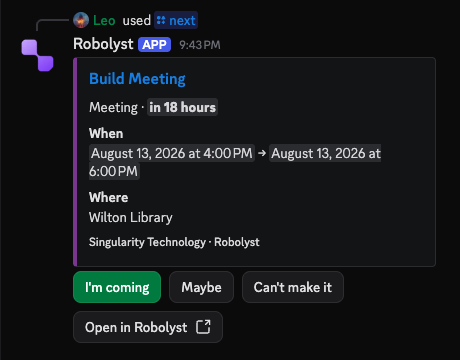
  • Meetings post a card with coming, maybe and out; that answer is the attendance register.
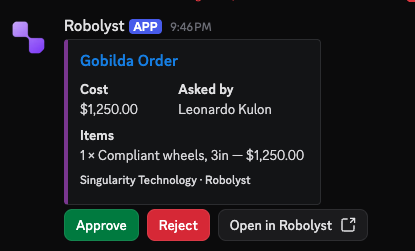
  • Order requests open a form in Discord and post with approve and reject buttons.
  • Checklist runs post a button per item, ticked from the phone already in your hand.
  • Roles map to Discord roles once, then channel membership follows the roster.
What the Discord bot does, in depth
Channel setup sample
  • Tasks forum build-tasks silent
  • Checklists forum pit silent
  • Announcements announcements @team
  • Schedule general silent
  • Orders purchasing silent
  • Leads only leads @leads
  • Match results not set, never posts silent

Seven surfaces, seven channels of your choosing. Nothing pings anyone unless you say so, and a surface you never point anywhere never posts, which is how you turn one off.
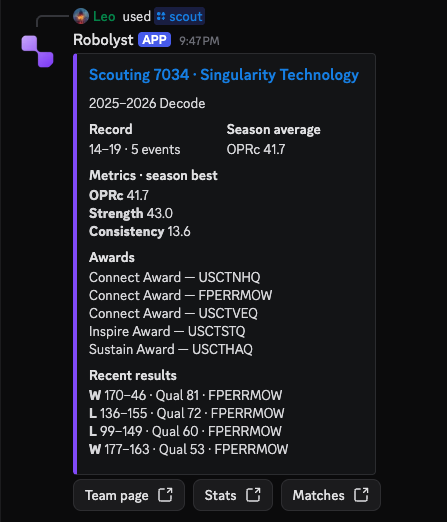
The Robolyst bot answering /scout in Discord with team 7034’s record, season metrics, awards and recent results
The whole FTC archive, answering in public.
A Robolyst meeting card in Discord showing when and where the build meeting is, with coming, maybe and can’t-make-it buttons
Saturday’s meeting, asking the channel who is coming.
A Robolyst order request posted in Discord with its cost, who asked and the items, under approve and reject buttons
A parts request, posted where the decision gets made.
Slash commands /task mine/next/order request/checklist run/scout/compare/rank/bracket/awards/nearby
Controls

Who can do what, who hears about it, and how the season is going.

A team is thirty students and four adults. The portal ships with real permissions instead of an honour system, and tells people what changed without anyone chasing them.

Stats

/team-management/stats

One dashboard for the season, built from work already recorded: attendance, hours, task throughput, documentation coverage, spend. Per member, next to the team average.

It exists to answer the questions a lead actually gets asked: is documentation behind, who has been carrying the build, are we going to run out of money in February.

Scouting and match metrics, the other half
Season so far sample
  • Attendance rate
    87%
  • Tasks finished on time
    74%
  • Documentation coverage
    61%
  • Meeting hours 142
  • Outreach hours 38

Settings

/team-management/settings

Roles & permissions 41 switches
Default permissions granted to each built-in role. Custom roles can grant any combination.
AreaOwnerManagerMember
Roster4/44/40/4
Subgroups1/11/10/1
Reading1/11/10/1
Composing & sending3/33/30/3
Triage2/22/20/2
Configuration1/11/10/1
Announcements1/11/10/1
Tasks1/11/11/1
Schedule1/11/10/1
Checklists1/11/10/1
Documentation1/11/10/1
Resources3/33/30/3
Stats1/11/10/1
Scouting1/11/11/1
Overview1/11/10/1
Orders2/22/21/2
Expenses1/11/10/1
Budget & reports1/11/10/1
Fiscal account1/11/10/1
Cards1/10/10/1
Donors1/11/10/1
Profile1/11/10/1
Page editor1/11/10/1
Sponsors1/11/10/1
Open source1/11/10/1
Forms1/11/10/1
Domain1/11/10/1
Analytics1/11/10/1
Team settings1/11/10/1
Tags1/11/10/1
Verification1/10/10/1
Roles1/10/10/1

Build your own roles on top of these: a Build Lead who can approve orders but not touch the website.

Notifications 45 events
How many notification events in each area are delivered by each channel, by default.
AreaIn-appEmailWebhook
Money (25)2322
Tasks (7)74
Roster (6)64
Competitions (2)222
Announcements (1)111
Schedule (1)11
Checklists (1)11
Platform (1)11
Inbox (1)1

Team-wide defaults, then every member overrides their own. Webhooks post into Discord or Slack. Team verification, the join code, and the due-soon window live here too.

Screenshots

What it actually looks like

Every one of these is the portal itself, captured out of the live demo, which anyone can open, without an account.
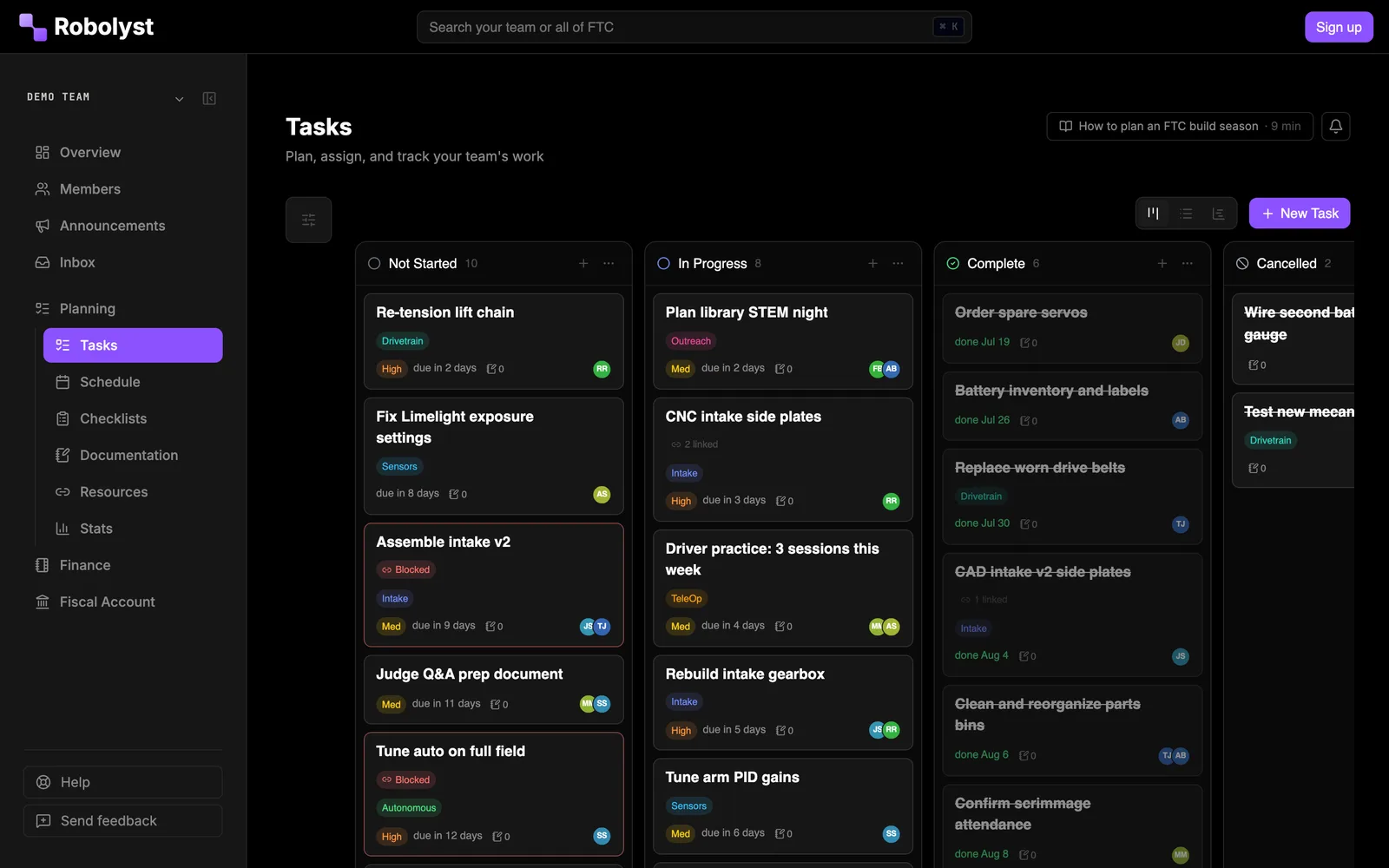
Robolyst FTC task board: build-season tasks in Not Started, In Progress, Complete and Cancelled columns, each card tagged by subsystem with a priority, due date and assignee.
The task board, with every card tagged by subsystem and owner.
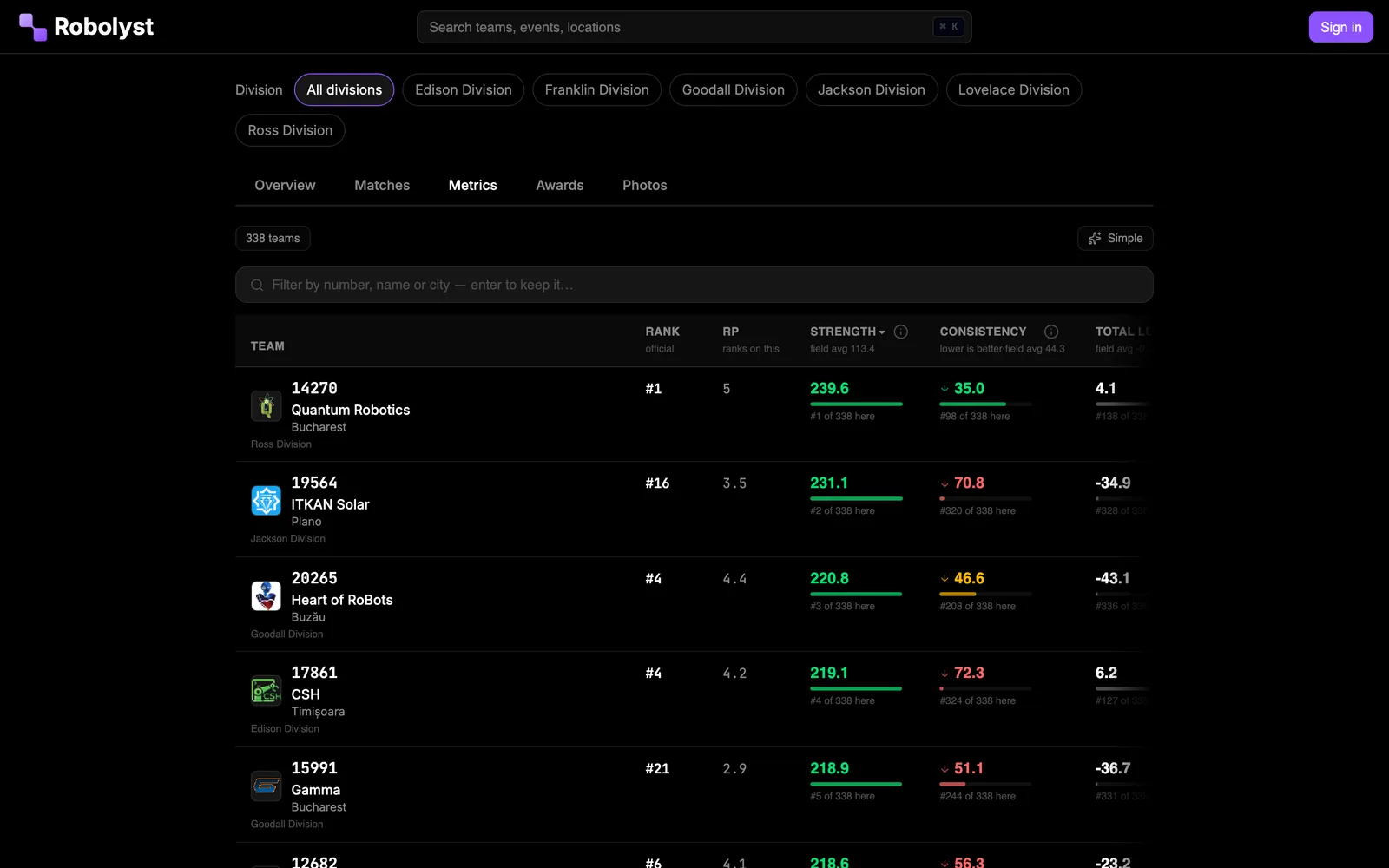
Robolyst FTC scouting metrics table for the FIRST Championship: 338 teams ranked with strength, consistency and luck computed from the published match results.
Every event gets this table, computed from the published results.
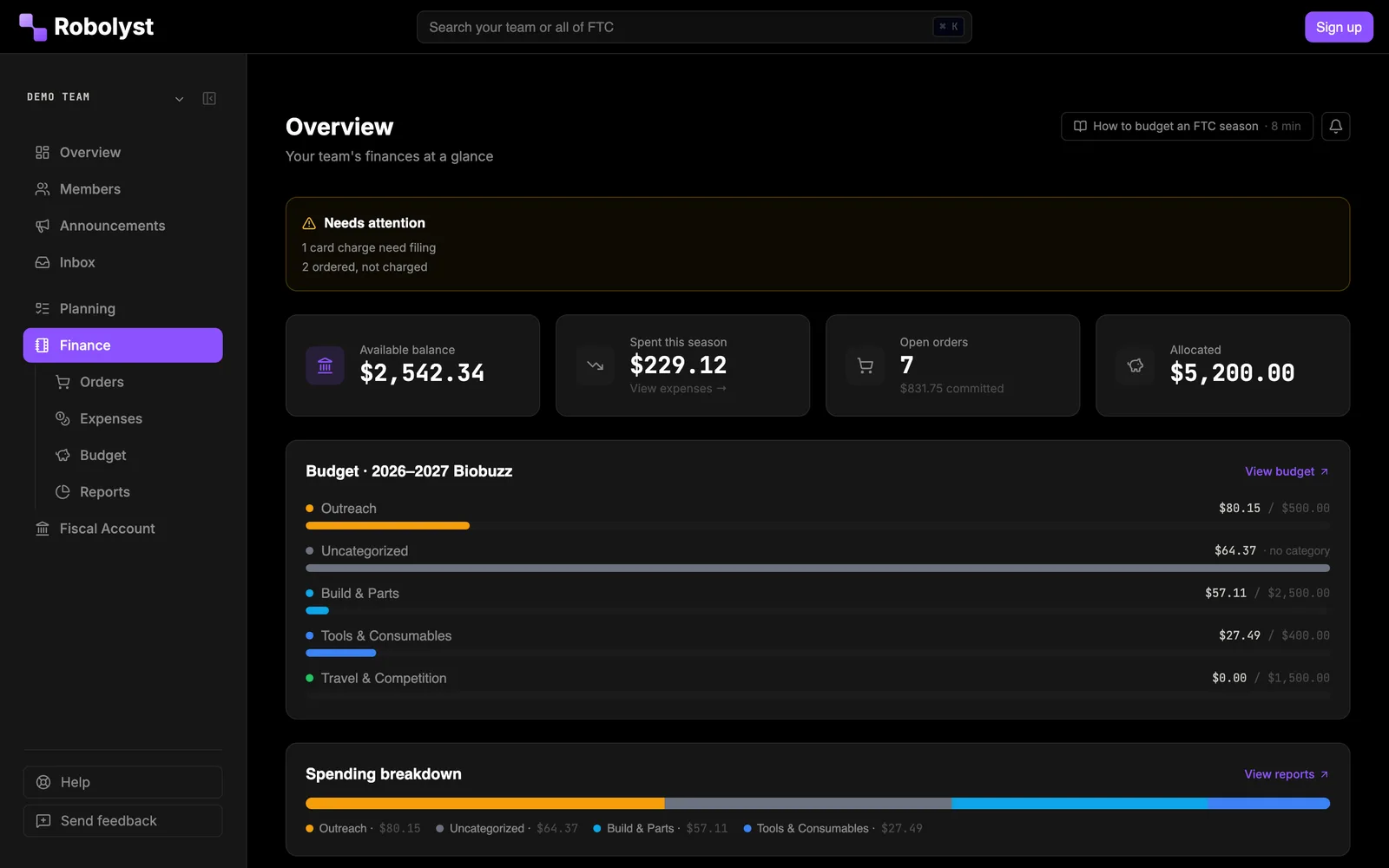
Robolyst FTC team finance overview: available balance, season spending, open parts orders and budget lines with the amount spent against each.
Orders, expenses and budget lines on one ledger.
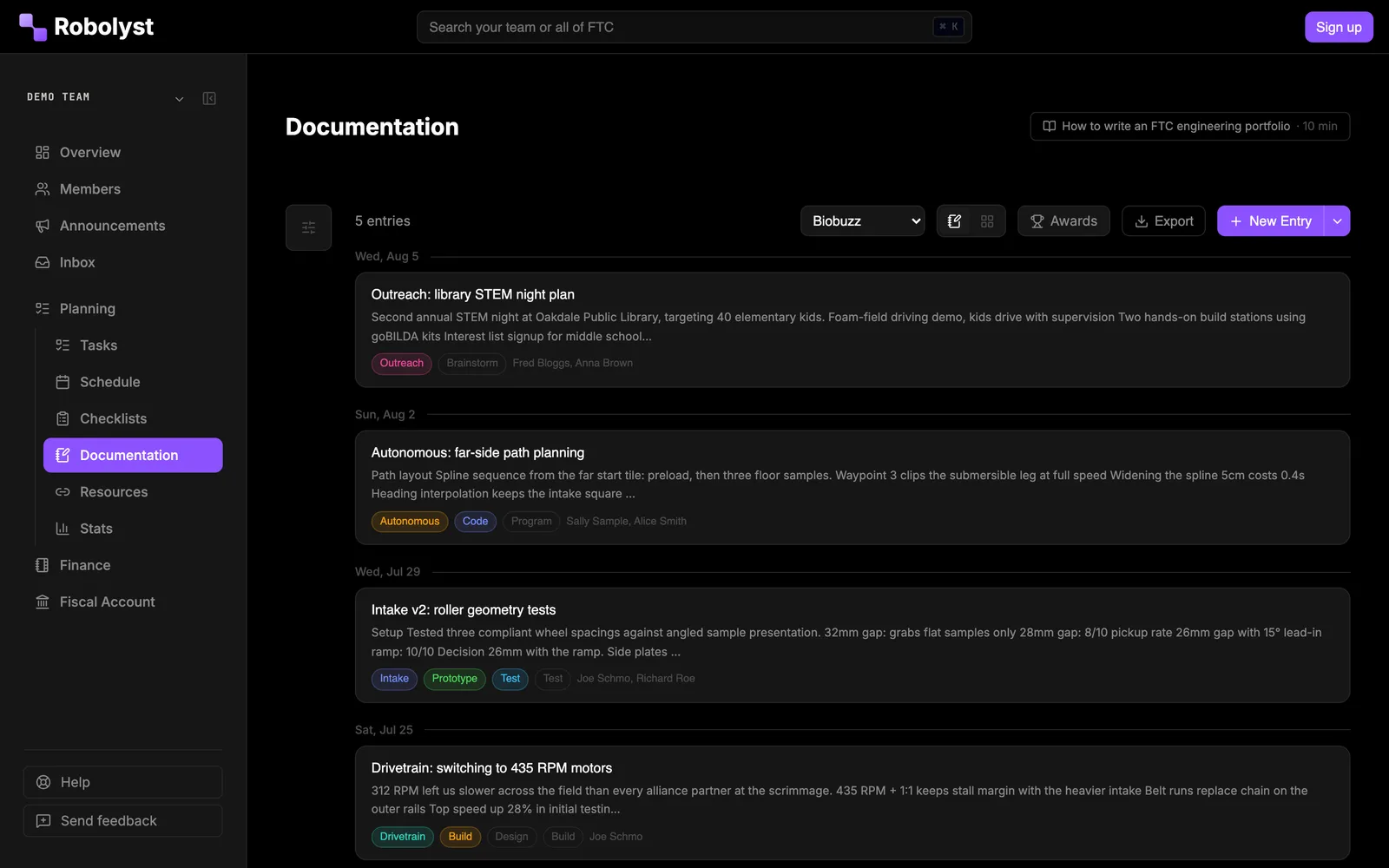
Robolyst FTC engineering documentation: dated build-log entries tagged by subsystem and design stage, from autonomous path planning to intake testing.
The engineering notebook, written as the season happens.
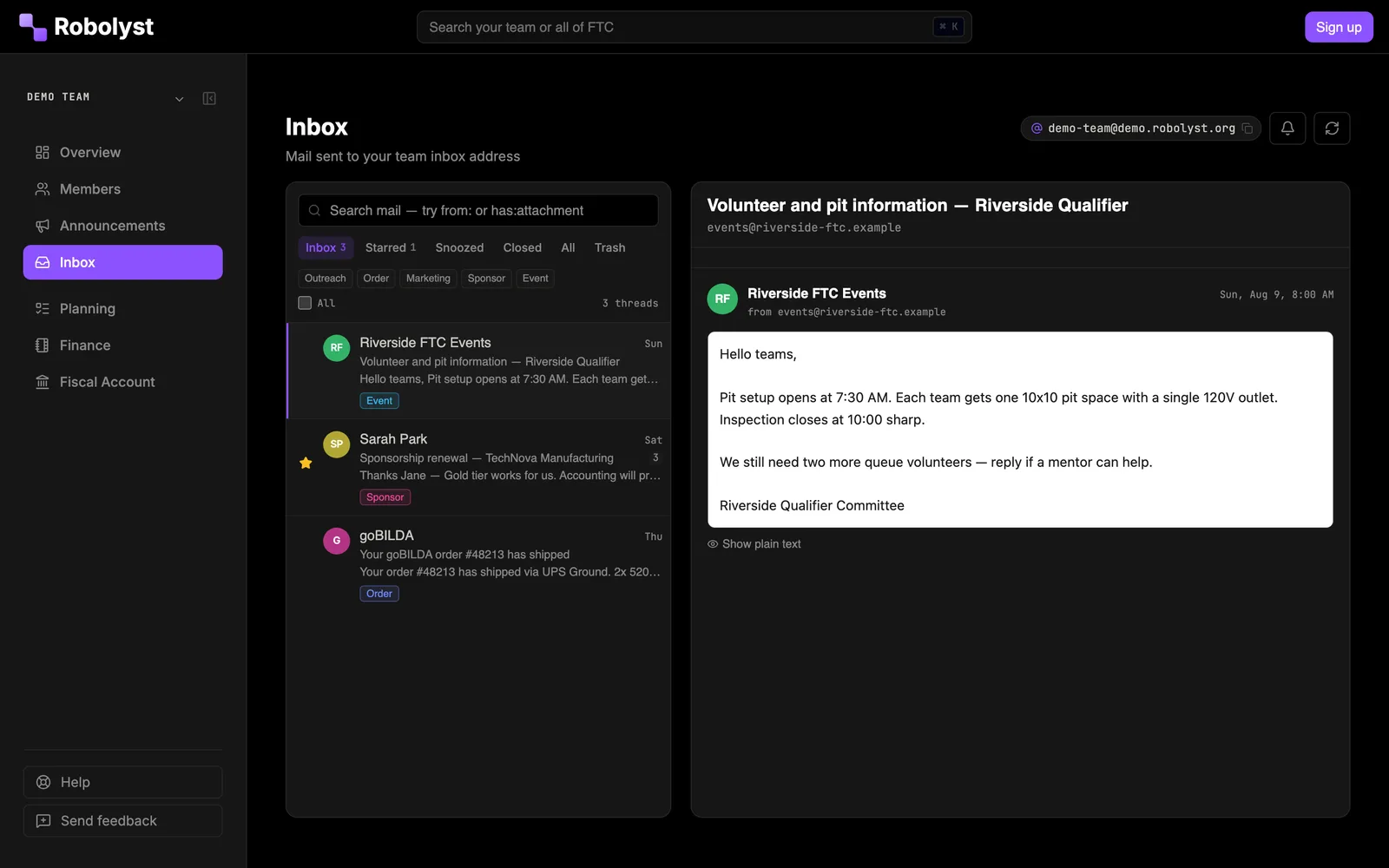
Robolyst shared team inbox: sponsor, order and event email threads labelled and read in a two-pane view the whole team can see.
One shared inbox for sponsors, schools and leagues.
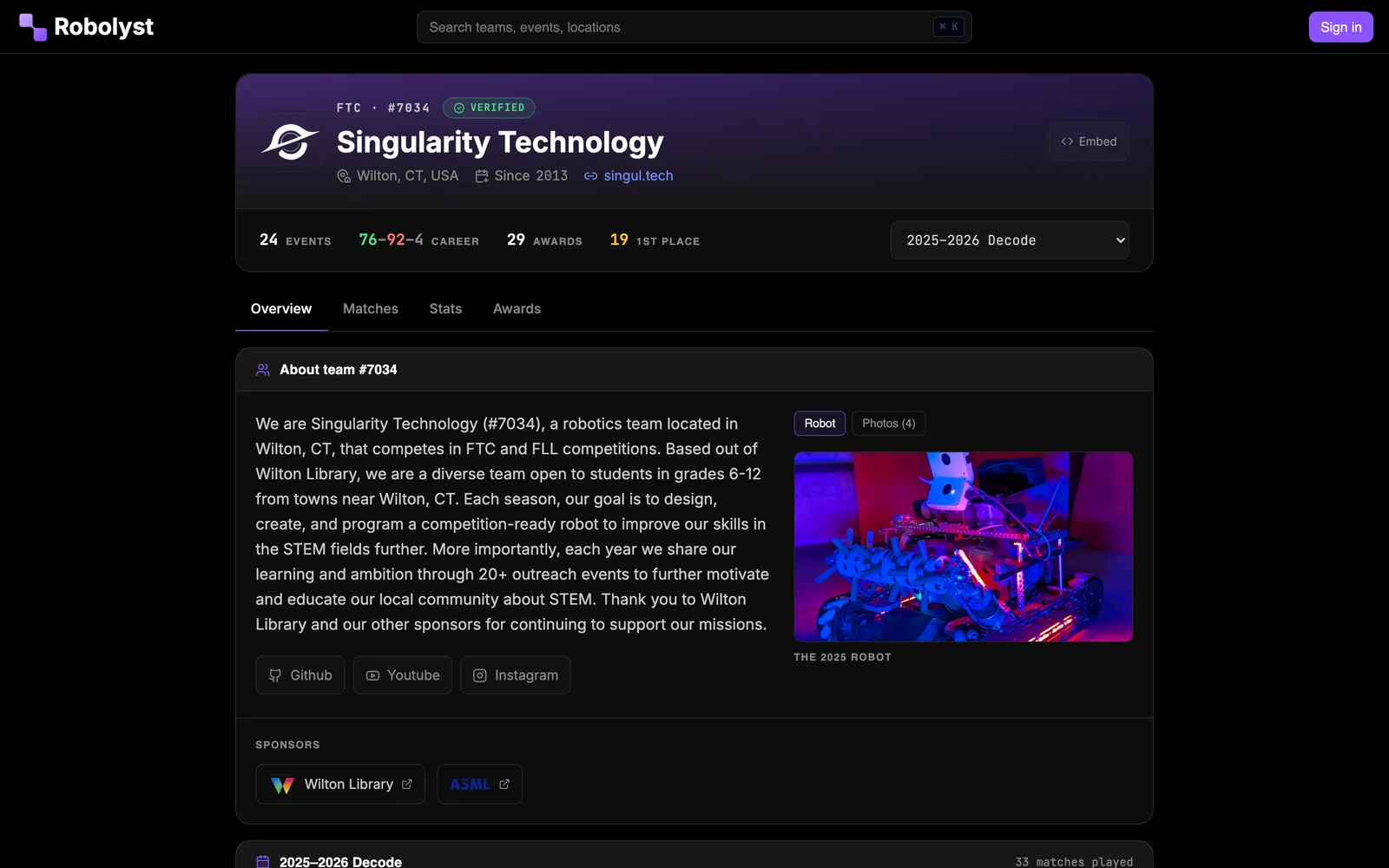
A public Robolyst FTC team page: team number, location, career record, awards, robot photo and sponsors on one page.
Every team gets a public page; teams that want more get a full site.
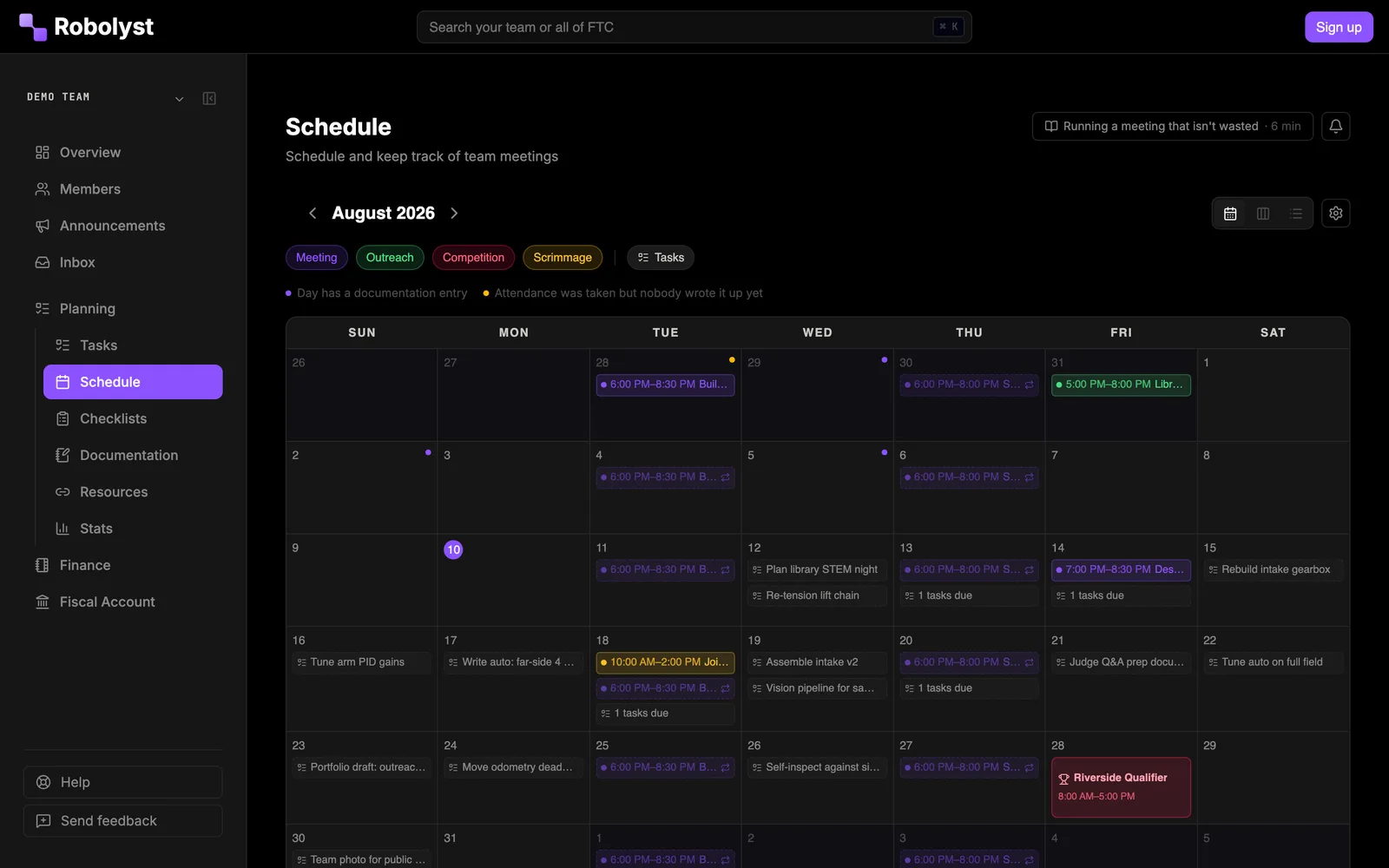
Robolyst FTC team schedule: a month calendar of meetings, competitions and deadlines for the season.
Meetings, competitions and deadlines on one calendar.
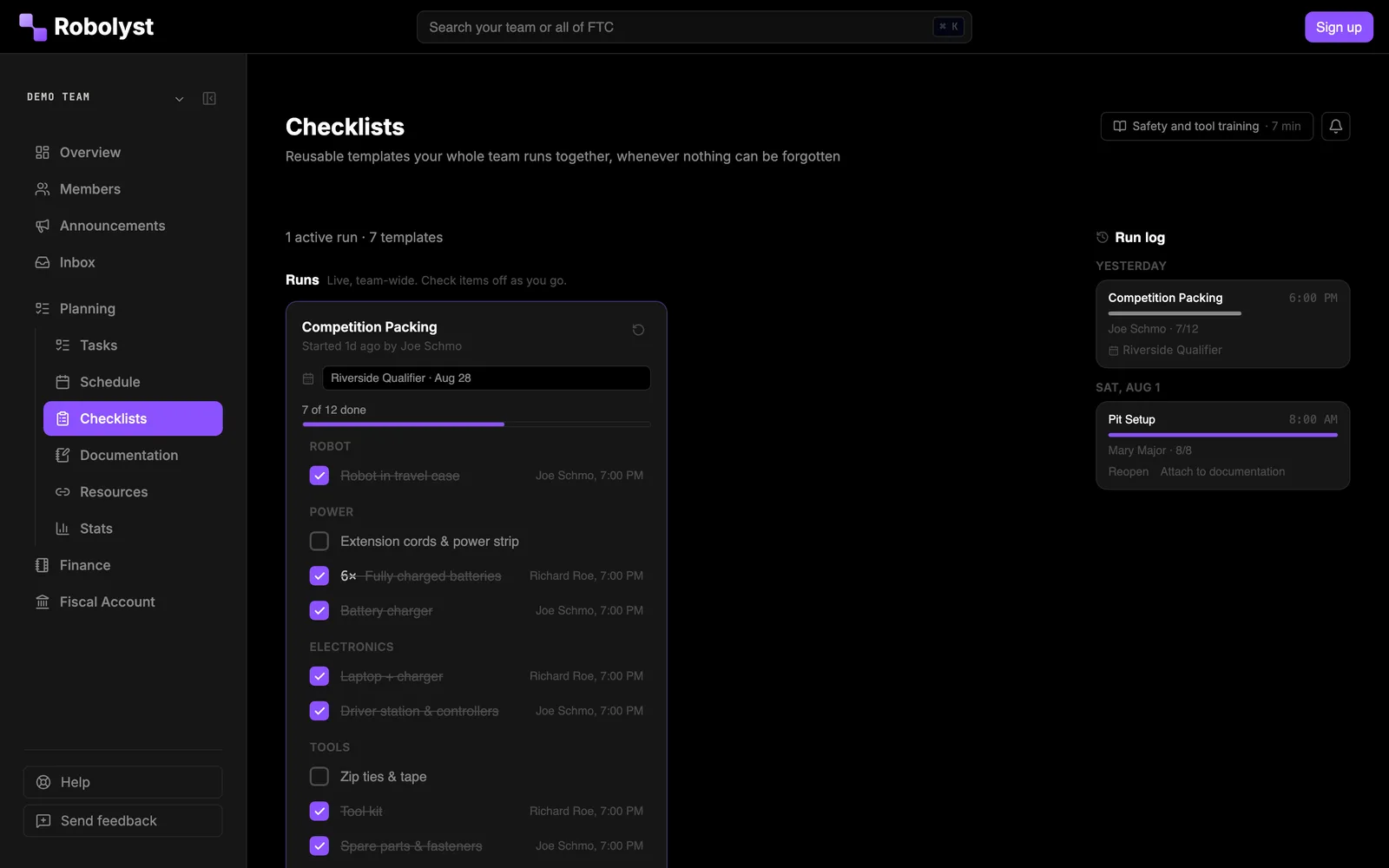
Robolyst FTC checklists: a competition packing list part-way through a run, items ticked off with who checked each one and when.
Checklists your whole team runs together on competition day.

Questions teams ask first

Is Robolyst free for FTC teams?
Yes. The whole toolkit is free to use. Robolyst is run by the Robotics Catalyst Foundation, a nonprofit, not sold as a subscription.
Do we have to type in our competition schedule and results?
No. Competitions are pulled from the official FIRST Tech Challenge schedule, and match results, rankings and season stats update from the same data as they are posted.
Who can see what we put in the portal?
Portal data (tasks, budgets, documents, the roster) is visible to the members you invite to your team. Your public team website shows only the pages you choose to publish.
Can we use our own domain for the team website?
Yes. Point your domain at Robolyst and your site is served from it with HTTPS; the robolyst.org address permanently redirects there.
Does it work with Discord?
Yes. A bot you add to your own server. Tasks open as threads that reply back, meetings ask who is coming with buttons, order requests are approved in the channel, checklists are ticked from a phone in the pit, and FTC team and event data answers on a slash command. Everything it does is written back to the portal.
Does it handle team money?
Budgets, parts orders, expenses and receipts live in the finance section, and teams under our 501(c)(3) fiscal sponsorship can take tax-deductible donations through it.
How long does setup take?
An afternoon. Create the team, invite the roster with one link, and import your competitions. The rest fills in as the season happens.
Do all our students need accounts?
No. Accounts are free and there is no cap, but the parts a whole roster touches work without one: the Discord bot takes RSVPs and checklist ticks from anyone in your server, the calendar feed is a subscribe link, and pit scouting is a QR code. A season runs fine with the leads signed in and everyone else reached where they already are.
How do we get everyone to actually use it?
Start with the two things that replace something instead of adding to it: connect the Discord bot to the server your team already lives in, and share the calendar feed so meetings land on the phones people already check. Announcements, RSVPs, and pit checklists all work from there. The portal is where the leads work; for everyone else it is invisible.

Set it up once, in an afternoon.

Create your team, invite the roster with one link, and pull your competitions off the FTC schedule. Everything else fills in as the season happens.

Talk to us and other teams in the Discord →